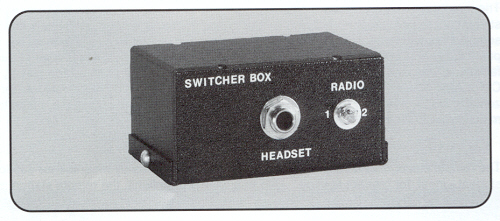
Ultralight aircraft intercoms, ultralight aircraft radio switcher box.

 Ultralight & Light Sport Aircraft Store
P.O. Box 20135

Barrie Ontario Canada L4M 6E9
705-726-81
71     705-726-5937 FAX

Airfield
1895 10th line east of Hwy 11
Bradford Ontario

Click here to go to the
ULTRALIGHT STORE

The L'il Buzzard ultralight trainer.

Top 10 reasons to consider a
 L'il Buzzard!
 

If a teacher discusses a unit with you well in advance, it is a certainty that she will be absent on the days scheduled, the substitute cannot administer the unit, and when the teacher returns she cannot do the unit because she has to make up for lost time.

 Click here for this months specials!


When was the last time you did maintenance on your K & N Airfilter? Is you filter safety wired? Click here to see how to clean and safety wire your airfilter!


Ultralight aircraft intercoms, ultralight aircraft radio switcher box.

Ultralight aircraft intercoms, ultralight aircraft radio switcher box.

Features


Specifications

Interface with two transceivers for selective transmission from either   Shielded heavy duty cables and plugs
Self contained, no battery required   All solid state electronics
Can be used with either a single helmet or headset and can be interfaced with the ultralight intercom for greater utility   Exclusive circuitry designed for clear communication transmission from one transceiver to another
Communicate on CB or VHF selectively with the flip of a switch   Requires one interface cable for each radio
    Can be used as a music interface, music in one channel com in the other

OPERATION  

Using two transceivers complete with UL TRA-COM interface cables  

1 Plug No.1 Switcher Box cord into No.1 Radio interface cable  

2 Repeat Step No.1 for Radio No.2

NOTE: Both radios should be equipped with remote antennas for best results  

IF USED WITH INTERCOM  

3 Plug one end of adapter cord (one included with intercom when originally purchased) into jack on Switcher Box and Plug other end into intercom jack marked "XMTR"  

4 Plug both helmets into intercom  

5 Turn on intercom and adjust volume for comfor1able listening (about 1/3 volume)  

6 Turn on Radio No.1 and adjust squelch to just cancel rushing noise. Adjust volume for comfort. Press No.1 radio push-to-talk switch checking transmission to another distant receiver. Make final minor adjustments and proceed to Step No.8  

7 Repeat Step No.6 for Radio No.2

IF USED WITH ONE HELMET OR HEADSET ONLY

8. Plug helmet or headset cord into jack on front of Switcher Box  

9. Repeat Steps No.1, No.2, No.6 and No.7

NOTE:
Adjust radio volumes and/or squelch controls if squealing or unwanted feedback is experienced. Many times this condition can be eliminated simply by relocating various pieces of equipment in relation to each other.  

When used without intercom you will not hear your own voice during transmissions unless your radio is equipped with a side-tone feature. Most hand-held portable radios are not so equipped.


Switcher Box $169.00 U.S.

Quantity:


Make yourself visible to others when your flying...... Strobe lights make you visible! Click here for more information!


Ultralight News
PO Box 1710
Holland Landing Ontario
L9N 1P2  
               647-723-8767

Airfield

1895 10th line east of Hwy 11
Bradford Ontario
 

Google
  Web UltralightNews.ca
Ultralight Aircraft News Web Magazine - PO Box 1710 Holland Landing, Ontario Canada L9N 1P2 - 647-723-8767
.
You may link to these pages or print them out for your own personal use, but no part of this publication may be copied or distributed, transmitted, transcribed, stored in a retrieval system, or translated into any human or computer language, in any form or by any means, electronic,  mechanical, manual, or otherwise,  without the written permission of Dave Loveman. By copying or paraphrasing the intellectual property on this site, you're automatically signing a binding contract and agreeing to be billed $10,000 payable immediately. Copyright Ultralight News -  Ultralight Flyer.  
Return to Main Index for this section